
 Telegram Order Notifications for WooCommerce
Turn your Telegram into a powerful WooCommerce command center!
Tired of refreshing your WooCommerce dashboard every few minutes? Worried about missing orders while you’re away from your computer? WooTelegram solves this problem forever. Get instant, beautifully formatted order notifications directly to your Telegram — whether you’re at home, traveling, or sleeping. Your store works 24/7, and now you can monitor it 24/7 too.
This isn’t just another notification plugin. It’s a complete order management companion built for serious WooCommerce store owners who value speed, reliability, and a clean professional interface.
 Why Choose WooTelegram?
 Lightning-Fast Notifications — Get alerts within seconds of a new order Lifetime License — Pay once, use forever. No subscriptions, no renewals Professional Dashboard — Clean KPI cards, sales analytics & order insights Order Status Timeline — See every status update sent to Telegram with timestamps Test Connection Button — Verify your bot is working in one click Mobile Responsive — Works perfectly on phone, tablet & desktop Easy 2-Minute Setup — Built-in step-by-step guide with video tutorial Multi-Admin Support — Send alerts to multiple Telegram users or groups Customizable Messages — Edit notification templates the way you want 100% Secure — No data sent to third-party servers, direct Telegram API
 Who Is This For?
 WooCommerce Store Owners who want instant order alerts
 Dropshippers managing multiple orders daily
 Digital Agencies handling client stores
 Small & Medium Businesses that can’t afford to miss a sale
 Remote Sellers who work from anywhere
 Powerful Features
 Real-Time Order Notifications
Receive instant Telegram messages the moment a customer places an order — complete with customer name, products, total amount, payment method, and shipping address.
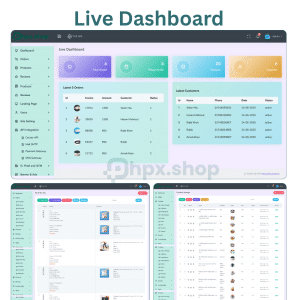
 Smart Dashboard
A beautifully redesigned admin panel showing:
 Order Status Timeline
Track every order status change (Processing → Completed → Refunded) with timestamps, all delivered to Telegram automatically.
 Test Telegram Connection
One-click button to verify your bot token & chat ID are correctly configured.
 Built-in Setup Guide
Step-by-step instructions + embedded video tutorial — no technical knowledge required.
 Clean, Professional UI
Modern card-based design that matches the WooCommerce style. Looks great on every screen size.
 What You Get Full plugin (.zip file) — ready to install Lifetime License — auto-activated on install Free lifetime updates Step-by-step video setup guide Email + Telegram support from Khaled IT Solution No domain restrictions — use on unlimited sites you own
 Requirements
 Bonus: Lifetime License Included
Unlike other plugins that charge $49/year, WooTelegram comes with a Lifetime License automatically activated upon installation. Pay once and enjoy forever — no recurring fees, no license keys to manage, no headaches.
 Why Buy From phpx.shop?
 Original plugin by Khaled IT Solution
 Instant download after payment
 100% safe & malware-free code
 Direct developer support
 Free updates for life
 Installation Guide (Step-by-Step)
 Step 1: Download the Plugin
After purchase, download the telegram-order-notifications-for-woocommerce.zip file from your phpx.shop account.
 Step 2: Upload to WordPress Step 3: Activate the Plugin
Click Activate Plugin — your Lifetime License will auto-activate instantly.
 Step 4: Create Your Telegram Bot
 Step 5: Get Your Chat ID
 Step 6: Connect the Plugin
 Step 7: You’re Done!
Place a test order on your store — the notification will arrive on Telegram instantly.
 Watch the full video tutorial inside the plugin’s “Guide” tab.
 Frequently Asked Questions (FAQ)
Q1: Is this really a lifetime license? Yes! 100% lifetime. No monthly or yearly fees. Install once, use forever.
Q2: Can I use it on multiple websites? Yes, you can use it on unlimited websites that you own.
Q3: Will I get free updates? Absolutely. All future updates are free for life.
Q4: Does it work with the latest WooCommerce? Yes, fully compatible with the latest WordPress & WooCommerce versions.
Q5: Do I need coding knowledge to set it up? No. The setup takes just 2 minutes. A full video guide is included inside the plugin.
Q6: Can I send notifications to a Telegram group? Yes, you can send to personal chats, groups, or channels.
Q7: Is my data safe? 100% safe. The plugin connects directly to the official Telegram API. No data goes through any third-party server.
Q8: What if I face a problem? Contact us anytime — we provide free support via Telegram, Facebook & email.
| Duration | 1 Year, 6 Month, Life Time, Reseller Package |
|---|


Reviews
There are no reviews yet.